Memaparkan catatan dengan label Info Terkini. Papar semua catatan

Isnin, 1 Februari 2016

SEO tips for beginners – 15 ways to Google boost your web site

As a beginner to search engine optimization (SEO) you need to understand that there is no magic way to rank your web site in the first page of Google, Bing or Yahoo. Search engines are governed by complex algorithms and it takes a lot of effort to ‘convince’ them that your web site or page deserves one of the top spots.
Nevertheless, there are certain rules you can follow to optimize your web site and provide the bots with the necessary signals.  While the web is floated with SEO tips and advice these are explained in a theoretical level and not how they can be applied in practice. In my opinion, this is why most web site owners are confused and they either give up with SEO or simply do not get the expected results.
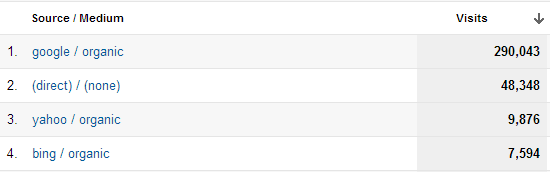
Google and Direct traffic
Our guide includes SEO advice that works. I have tested this strategy over the years on a number of web sites with remarkable results. Of course there are many other things you can do to help your web site achieve better rankings but the tips presented below can give you a solid and reliable framework that is 100% safe (i.e. you don’t take any risks) and above all it works.
In addition, along with the tips I have added real examples from two clients web sites (both are less than 1 year old), that I’ve been doing SEO work, to help you understand how to apply the guidelines on your own web site or blog.

1. Page Titles and description

Page titles
Page titles are a very important aspect of SEO and this is why it is first on the list. My findings the last couple of months show that page titles are more important than ever especially for Google SEO. Exact page titles for low volume keywords can give you a competitive advantage in search results but this is something I will discuss in another post. For now the most important characteristics of a page title are:
  • Each page needs to have a unique page title that accurately describes the page’s content.
  • Be brief and descriptive.
  • Help the user understand what the page is about
Home page title: The title for your homepage can list the name of your website/business and could include other bits of important information like the physical location of the business or maybe a few of its main focuses or offerings. For example:
page titles demo for best SEO
Post/other pages title:
Title of other posts/pages of your web site should accurately describe what the page is about and be attractive for the searcher.

Page description and google authorship status
Description
A page’s description meta tag is also very important. It gives users, Google and other search engines a summary of what the page is about. Google may choose to show what you type in the description as a snippets for your page or may decide to use a part of your page’s content. In other words it does not mean that what you write in the description will show in the snippet. The guidelines for writing a good description are:
  • Always provide a unique description for all pages, post, products of your website.
  • Keep the size between 150-160 characters.
  • Avoid repeating the title in the description
  • Don’t add too many keywords
  • Try to use the description as a way to ‘advertise’ your page to the reader so that they click on your title and visit the page.
You can see from the examples above how I use the description tag for my pages.

2. Permanent link structure

The permanent link structure is a term used to describe the format of URLS for pages (categories/tags) or individual posts of a web site. It is shown in the browser address bar and in the search results (below the page title).
Example of good optimized URL Structure
Guidelines for optimized link structure
  • Make Urls simple and easy to understand for search engines and users
  • Use hyphens ‘ – ‘ to separate the words that make up a url
  • Avoid lengthy Urls with unnecessary information
  • Use words that describe what the page is about but avoid keyword stuffing
Examples of BAD url structures
http://www.example.com/UK/123213/5005.html
http://www.example.com/socialmedianews
http://www.example.com/id=7&sort=A&action=70
Examples of GOOD url structures
http://www.example.com/social-media-news
http://www.example.com/2002/12/social-media-news

3. Breadcrumb

Make sure that you have a breadcrumb in all your internal pages. A breadcrumb is a set of links at the top of the page that aid navigation.  If you are using WordPress there are many free plugins to create a breadcrumb.
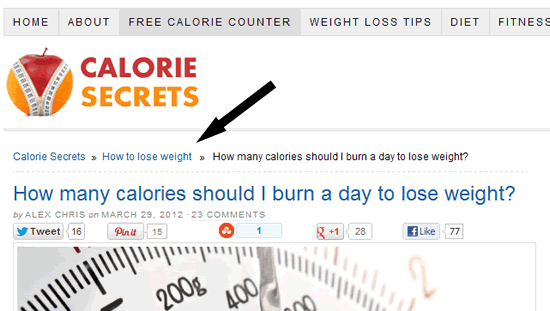
Breadcrumb sample

 4. Internal links

When we talk about internal links we mean links in a page that point to other pages within the web site i.e. not external links. In the example below when you click on the link with anchor “increase the intensity” you will be redirected to a page with-in the web site to find out more information on how to increase the intensity of an exercise.
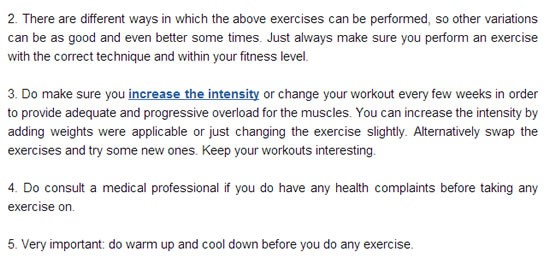
Example of internal links
Internal linking is a very important factor for web site SEO but still many web site owners are not using it correctly. The rules to follow for internal links are simple:
  • Link related articles together either by using keyword anchor text or by using the full article title
  • Make sure that the links are useful both for the user and easy to understand by search engines.
  • Don’t make links for search engines only. An internal link should help the user navigate the site better.
  • Do not use terms like ‘click here’ or ‘[..]’ for internal linking.
  • Don’t overdo it. 4-5 internal links per page are enough (create more if really necessary)
Don’t always link old posts from new posts but every couple of weeks go back and link newer posts from older posts. It’s not an easy task to do especially if you have a lot of posts but it’s a very valuable tool for on-site SEO.

5. Text formatting and the use of H1, H2 and H3

Don’t just publish text on your web site without first doing some basic formatting. This is not good for the user experience and works against your SEO efforts. General guidelines for formatting a post or page on your web site:
  • Use H1 tags for the title of your post
  • Use H2 tags for the main headings of your post.
  • Use BOLD and Italics to draw users attention
  • Don’t use H2 tags for all your headings
  • Write small paragraphs
  • Use a font size that is easy to read
When formatting your posts always have in mind the user experience. Can the user identify the main sections of your post (H2 tags) just by looking at the page? Is the text easy to read even on other devices (Apple Ipads, Android tablets etc)?
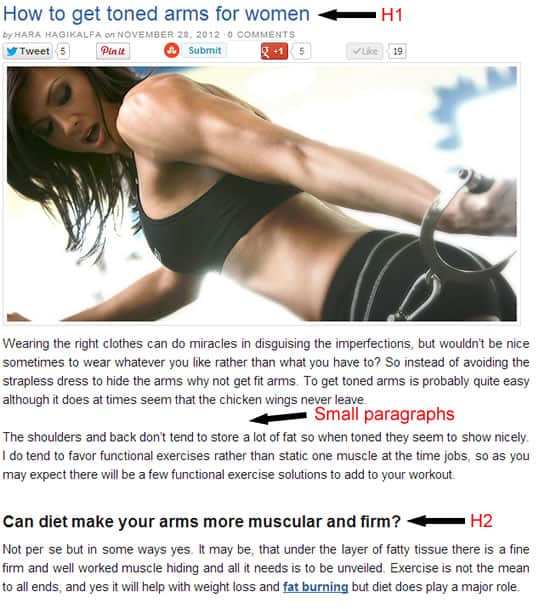
page formatting for seo
Click on the image for a larger view (and to see H2)

6. The 404 Page

SEO is about improving the user experience and a proper 404 page contributes to that goal. The 404 page is the page shown when a user is looking for a page on your site that doesn’t exist or mistypes a URL or follows a broken link. When the 404 page is not configured looks like this:
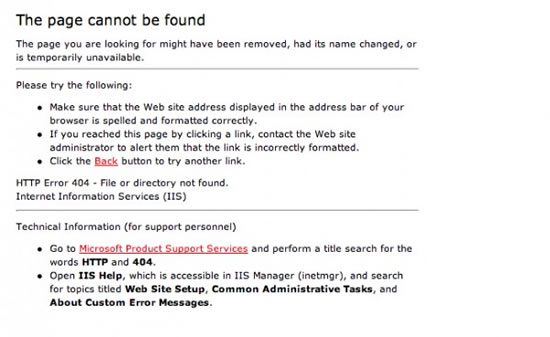
404 default page
This is not useful for the user and negatively impacts the user experience.
A properly configured 404 page should:
  • Give some info to the user of what happened rather than displaying “Not found”
  • Have a design consistent with the rest of the website
  • Give options to the user to navigate to other pages of the site.
If you are using a professional theme (like Thesis), it takes care of the 404 page. This is how my 404 page looks like:
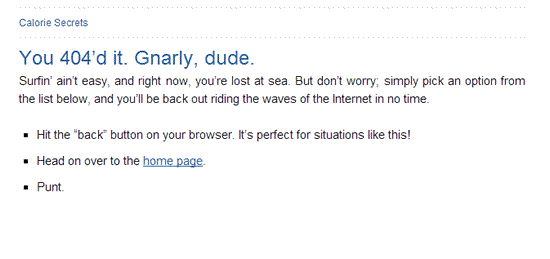
Custom 404 page

7. Image Optimization

Images are sometimes necessary to enhance the user experience but care should be taken not to create other side effects like problems with page load speed or slow response. Especially after the success of Pinterest many webmasters started using more images in their posts. If you do decide to use images, mind the following:
  • Use Alt Text to describe the image. You can add keywords but don’t overdo it.
  • Use keywords in image filenames (separated with dashes). Avoid using filenames like image1.jpg or person1.jpg. Instead use meaningful names with dashes. For example woman-working-out.jpg
  • Keep all image files in a dedicated folder in your site i.e. www.mydomain.com/images/
  • Optimize the image size. The smaller the size of the image (in KB) the faster is your web site. You can use this free tool from Yahoo to make your image size smaller without losing the quality.

8. Page Speed

Google has many times said that page speed is a ranking factor and yet many webmasters don’t optimize their web sites for speed. Their aim (Google’s) is to provide the searcher with the most accurate results in the fastest possible way. It is certain that page speed (as a ranking factor) will gain more importance in the next couple of years.
Fast web sites improve the user experience and it is a factor to encourage the visitor to come again. In addition, a web site that loads in less than 8 seconds is more likely to:
  • Rank better in search results
  • Get more page visits per user
  • Get more conversions
How to tackle the page speed problem?
  • Remove any unnecessary plug-ins (if you are using WordPress) or java script from the pages.
  • Optimize the size of your images
  • Use a caching service or plug-in (I use WP Super cache and W3Total Cache).
  • Go to http://www.webpagetest.org/ and test how many seconds it takes for your pages to load from different locations, internet speed and browsers. The analysis report at the end will also tell you which components of your page take too long to load so that you can remove them.
  • Go to Google Page Speed Service  to analyze your web site and get performance recommendations.
  • If you have a lot of images on your site and you cannot improve performance with the recommendations given by the tools mentioned above you can consider using a CDN (Content Delivery Network) service such as Cloud Flare or Amazon Cloud Front
I know that tackling issues related to performance is a technical issue and sometimes it’s not easy for the average user to identify and solve the problems. Nevertheless it is a very important factor for SEO and should not be neglected. If you can identify that your web site has performance issues you can either hire a developer through odesk.com for example, or hire me to help you out.

9. Google authorship

What is Google authorship status?
It’s a way to bind your content with your Google+ profile. When you do that successfully your picture appears in the Google search results next to your content (see example with my picture above)
How Google authorship status relates to Search Engine Optimization?
  • It improves the credibility of a web site in both the minds of users and search engines.
  • Studies have shown that more people are likely to click a link from the search results if the author is verified.
  • You increase the chances of getting natural links (people are more likely to link to your web site or page if you are verified).
  • There is also a confirmed hidden benefit from authorship status which gives you additional listings in the SERPS.
How to get a Google authorship status? You can follow the instructions here

10. Mobile friendly web sites

A significant number of searches performed each day are through mobile devices. Many studies over the last 6 months identified that the number of searches using smartphones is steadily increasing especially when it comes to making online purchases.
I am sure that if you have a look at your analytics data you will see a good percentage of your daily visits coming from mobile. In the example demonstrated below, almost 30% of the traffic is from mobile with Apple products (iPhone, iPod and iPad) being on the top positions.
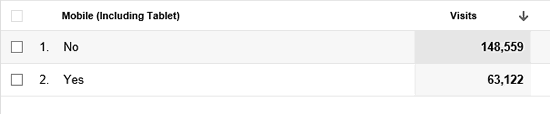
mobile visits statistics
It’s not in the scope of this post to go in detail into mobile SEO but there some simple steps to follow to ensure that you web site is mobile friendly.
  • First thing to do is understand the difference between a mobile friendly web site and a native Android, iPhone or Windows Mobile app. After talking with a number of webmasters I realized that many people fail with their mobile strategy because they do not understand this difference and because they have not yet realized the enormous potential of mobile markets.
  • A mobile friendly web site is optimized for viewing on the mobile browser (i.e. Chrome on android or Safari on iPhone).  A native android (iPhone or Windows Mobile app) is an application that can be downloaded from the mobile markets (Google Play or Apple Store). I will cover this with more details in another post but for SEO purposes you must provide a mobile friendly version for your users coming through mobile browsers.
  • The easiest way to create a mobile friendly web site is to use a plugin (if you are using WordPress) or a service (there are free and paid) which will optimize your web site for mobiles.
  • I personally use wp-touch pro for all my websites but there are many others. Read this guide from Google for more information and resources.

11.  User Sitemap

A sitemap is a list of all posts/pages of your web site.  You need 2 types of sitemaps. First an xml sitemap to submit to Google, Bing and other search engines and second an html sitemap to help visitors find your content easier. It is recommended to place a link to your user sitemap from the main menu.
XML Sitemap (for search engines)
 Depending on your blogging platform you can use plugins to create and update your web site’s sitemap. When viewed in the browser it looks like this:
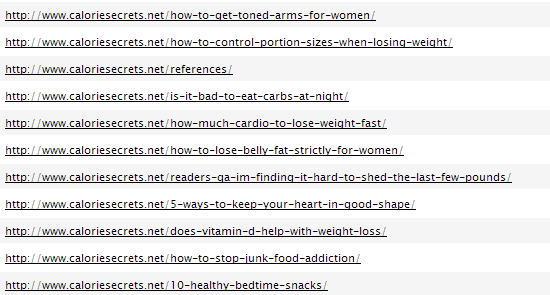
Example of XML Sitemap
HTML Sitemap (for Users)
The user sitemap should provide links to all (or to the most important pages of your site). It can also group posts by author, date, category etc. Its purpose is to help the user find information on your site easier and quicker. My user sitemap looks like this:

HTML Sitemap exampe

 12. Content is still king

In order for the above tips to work you need first and foremost to have good content on your web site. Content is still king and a web site with good, original, quality content can do better in the long run (with or without SEO) than a web site optimized in SEO but with not  so good content.
What is good content?
When people search on Google, Yahoo or Bing they are essentially looking for answer to a question. Good content is post or page that answers this question. 
How do I know if my content is good?
There are two simple ways to understand if your content is useful. First you can check your analytics and especially the time spend on a page. A reader will stay longer on the page if the content is good and second the number of social media shares (Facebook likes, tweets etc.). This is actually a very good way to understand what user’s want and what type of content to provide in your web site or blog. (I will discuss in a different post how to promote your web site on social media).
How to write good content?
There is no simple answer to this question but the following guidelines can put you in the correct direction:
  • Make sure that your content delivers what promised in the title. If for example your title is “How to lose 15 pounds of fat” make sure that your post provides an accurate description (or steps) that someone can follow to achieve the desired result.
  • Check your text for typos, spelling and grammar mistakes.
  • Format your text (as explained in Tip 8 above)
  • Provide links within your content (where appropriate) to other pages on your site (or other sites) to get more information.
  • Include references from established research or studies (where appropriate) to prove that what you are saying or suggesting is correct. 
Quantity VS Quality 
Many people often ask me “How long (in words) should I make my posts?” You should understand that there is no single answer that fits all purposes. It greatly depends on the type of post and topic. For example the post you are reading now is more than 4000 words because it is a vast topic. In order to explain someone the basic rules of SEO I had to make the post that long.
If for example you are writing about the benefits of black chocolate then surely you won’t have to write that much. This is exactly where quantity vs. quality comes into place. It’s better to write a quality post without counting words rather than a long unfriendly post for the sake of providing more word count.
Google’s official view about content length is very clear: Short content can be useful and rank well.
What does Google consider good content?
A couple of weeks after the release of Penguin Google published a set of criteriafor accessing the quality of a web site. Among the suggested guidelines they included some questions to ask after you finish a post, to help you determine the quality of your work.

13. Fresh Content

Having fresh content is an incentive for visitors to come back and for search engine bots to visit and crawl your web site more often.
This is true when you really have something new to say about the niche or topic your covering. Avoid publishing pages with similar content just for the sake of updating your web site or blog.

14. Check your external links

External links (links in your web site pointing to other sites) are important for SEO. In general ensure that:
  • You are not linking to spam web sites or web sites with inappropriate content
  • You have no broken links i.e. links to web sites or pages that no longer exist (you can use xenu – a free tool to analyze your external links).
  • You are not in any way selling or exchanging links
  • Any links in your comments section carry the nofollow directive

15. Webmaster tools and Analytics

Google and Bing have what is called webmaster tools. This is the place to register and submit your web site to their index. After submission you can visit the webmaster central and get valuable information about your web site.
Although this is not directly related to SEO when you submit your web site to Google webmaster tools and Bing webmaster tools you gain a number of advantages:
  • It’s a way to tell search engines about your web site (by submitting your sitemap)
  • It’s a way to get feedback on the number of pages indexed
  • It’s a way to get notified about potential problems i.e. access issues that restrict web sites from crawling your content
  • You can see the number of incoming and internal links.
Also, it is very important to use Google Analytics (or any other traffic analysis tool) to:
  • Find out how visitors find your web site (direct visits, search, referrals etc)
  • How much time they spend on your pages (and on which pages)
  • What keywords they used
  • How many pages they view per visit

Khamis, 1 Oktober 2015

[KEBERSIHAN KOMPUTER] - System Clean 1

[KEBERSIHAN KOMPUTER]

Assalamualaikum...dan selamat petang..

Di sini saya ingin sambung lagi isu berkenaan KEBERSIHAN KOMPUTER!

Sebelum ini saya ada terangkan kebersihan laptop terbahagi kerpada dua iaitu :

  • Kebersihan dalaman (System Cleanness) 
  • Kebersihan luaran (Physical Cleanness) 
Hari ini saya akan bercerita berkanaan kebersihan dalaman dahulu..kenapa saya ingin ceritakan System Cleanness dahulu? Kerana ia antara perkara yang amat mudah tetapi ramai yang abaikan dan menyebabkan komputer anda semua semakin lama semakin lembab dan hang...

Apa itu kebersihan dalaman (System Cleanness) ini?

Kebersihan dalam ini adalah salah satu konsep penyelenggaraan komputer...YA. Computer Maintenance...mesti ramai yang agak terkejut.....ya, computer maintenance ramai yang sangka ia adalah sesuatu yang susah dan hanya yang pakar sahaja boleh lakukan? Ya, mungkin ada sesetengah perkara hanya yang pakar sahaja boleh lakukakan, namun terdapat juga computer maintenance yang anda juga boleh lakukan.

Terdapat juga simple computer maintenance yang anda boleh lakukan untuk memastikan komputer anda sentiasa berada dalam keadaan optimum...

Apa yang perlu dilakukan untuk Basic Computer Maintenance?

Basic computer maintenance ialah anda hanya perlu lakukan maintenance yang wajib dan PENTING dahulu. So, apa yang wajib dan apa yang penting?

PERTAMA: Windows Start up.:> Pastikan windows start up anda mempunyai setting yang paling minimum atau start up software yang paling sikit...


Definisi Windows Start Up:

Programs or shortcuts placed in the Startup folder will run wheneverWindows starts. Click the Start button , click All Programs, right-click theStartup folder, and then click Open. Open the location that contains the item to which you want to create a shortcut. Right-click the item, and then click Create Shortcut.

So, setakat ini dahulu...nanti kita akan bersambung lagi di lain hari...semoga anda mendapat manfaat...

Selasa, 3 Mac 2015

Dapatkan cara untuk untuk hindar GST...terbaik

Berkaitan GST...

Saya adalah peniaga dan juga penggu....GST di Malaysia semakin PANAS dan SENSITIF....

Namun, kita setuju atau tidak, kita HARUS harungi peraturan baru ini dengan strategi dan persedian yang BETUL....

Saya juga PENING dan KELIRU berkaitan GST ini.

atas kesedaran dan ingin MEMBANTU orang ramai dan pemilik bisnes MEMAHAMI seterusnya MENGHINDARI DARI DITIPU oleh pekedai, pembekal atau pemborong berkaitan GST, saya ingin berikan penerangan berkaitan GST ini di samping di bantu oleh PEGAWAI KASTAM !

Ya! saya bawakan kepada anda terus PEGAWAI KASTAM untuk membantu saya memberikan penerangan berkaitan GST ini dan tips2 untuk hindari dari DITIPU.

KLIK LINK INI
https://www.facebook.com/events/399933500167617

Jika tiada akaun FB sila klik sini
http://gst-finale2015.eventbrite.com/?aff=efbevent


Sekian, terima kasih


Yang benar,

Norzureimy Mursal
Pengarah
MARZ TECHNOLOGY & TRADING

========================================================================

Related to GST ...
I was a dealer and also consumer ....

GST in Malaysia and is getting HOT and SENSITIVE ....

However, we agree or not, we HAVE to get through the new rules with strategy and readiness Correctly  ....

I also STUCK  and CONFUSE with this GST. but based on awareness and want to HELP people and business owners next UNDERSTANDING OF AVOIDING FRAUD by retailers, suppliers or subcontractors in connection GST, I want to give explanation on the GST is in addition to assisting by CUSTOMS OFFICER! Yes! I bring to you directly CUSTOMS OFFICER to help me give explanation on this GST and tips2 to avoid from FRAUD.

CLICK THIS LINK
https://www.facebook.com/events/399933500167617

 If have no FB account please click here
http://gst-finale2015.eventbrite.com/?aff=efbevent


Thank you

Yours faithfully,
Norzureimy Mursal
 Director of Marz Technology & Trading

Khamis, 12 Februari 2015


BAGAIMANA MENGATASI GST TANPA MASALAH???
=======================================

*Risau bagaimana ingin hadapi GST?
*Masih mencari cara untuk mengatasi masalah GST?
*Adakah anda PERLU atau WAJIB daftar GST?
*Adakah anda rasa yakin anda TIDAK AKAN DIKOMPAUN disedabakan GST?

Ketahui bagaimana syarikat anda utk jimatkan BERIBU RINGGIT dengan mengetahui GST DAN CARA BERJIMAT cara betul.

Dapatkan maklumat yg tepat di sini!

Tajuk : BAGAIMANA MENGATASI GST TANPA MASALAH???.

Tarikh : 14 Feb 2015
Masa : 9 am.
Tempat : Damansara Perdana
Yuran : RM 299

EARLY BIRD : RM 199. Daftar dua orang RM 300


CEPAT ELAKKAN SYARIKAT ANDA DARI RUGI BERIBU RINGGIT DAN DIDENDA!

SMS "GST1" ke 012-6768750 utk dptkan tempahan awal.
https://www.facebook.com/events/744350649006284/

>>Penceramah jemputan dari Jabatan Kastam Di Raja Malaysia
>>Jimat DUIT dari upaha akauntan untuk pendaftaran No GST RM 300!!
>>Modul memenuhi keperluan pelesen GST dan TERKINI
>>Mengetahui jenis-jenis INPUT yang boleh DITUNTU.
(Tuntutan ke atas stok sedia ada)
>>Mengelakkan dari ditipu pembekal atau vendor (Walaupun syarikat anda tidak WAJIB daftar GST, anda perlu tahu juga!)


BONUS!!
======
**PERCUMA PENDAFTARAN SYARIKAT UNTUK NOMBOR GST DENGAN KASTAM BERNILAI RM 400**

**PERCUMA GROUP SUPPORT BERNILAI RM 999**

**PERCUMA COACHING GST BERNILAI RM 1999**

**SIJIL DAN NOTA DIBERIKAN**

Tempat adalah terhad! 20 peserta sahaja.

SMS "GST1" ke 012-6768750 utk dptkan tempahan awal.
https://www.facebook.com/events/744350649006284/

Modul:=
GST AWARENESS
1 - Pengenalan
2 - SST
3 - Kenapa GST
4 - GST
5 - Pembekalan GST
6 - Layanan terhadap GST
7 - Isu - isu GST
8 - Kesimpulan

GST Accounting
1 - Pengenalan
2 - Input Tax Credit
3 - Output Tax Credit
4 - GST Invoice
5 - GST return (GST 03)
6 - GST Payment

Ahad, 23 November 2014

Are your computer slow, hang or affected by VIRUSES????

Hi, Subscriber
Thanks for supporting us!

My name Reimy, i'm director of Marz Computer Subang.
I started with very difficulties and hard times.
But with full support of our beloved customers,
I can stand until now. :)

This year is 5th year we operate in this computer retail.
All this time I have been through a lots of things.
But I can face all the problems with Subscriber supports.

So, I think to give back somethings that may useful to Subscriber.

Here is the present for you!


Get ‪#‎FREE ‪#‎FORMAT ‪#‎VOUCHER here...
In conjunction with end of 2014, we are very glad to give you all Free Format Voucher just for 100% free.
How to get it?
-Please like our ‪#‎FB Page: Latop Repair Experts (https://www.facebook.com/marzcomputertrading
-Please share this post
-Fill up this form to get your Free #Format Voucher (http://marzcomputer.activehosted.com/form/1163)
-You can bring your ‪#‎computer or we can pickup for you so we can format for you at 100% FREE (https://goo.gl/maps/TBDwh)
Note : this promotion end 30 Nov 2014

Last,but not least. I hope Subscriber happy with our services. Our intention is TO HELP ALL OUR CUSTOMERS HAPPY WITH THEIR COMPUTER.

Happy Smile from me,
Reimy
Director
Marz Computer Subang

Sabtu, 22 November 2014

FREE FORMAT COMPUTER FOR ALL

SALAM SEJAHTERA SEMUA...


Nama saya Reimy, Saya merupakan pengasas bagi Marz Technology & Trading. Saya telah menjalankan perniagaan ini secara rasmi lebih dari 6 tahun. Namun saya terlibat dalam pernigaan secara tidak rasminya lebih dari 10 tahun...Lamanya..hehehe


Banyak yang telah saya lalui dan tempuhi, pelbagai kisah suka dan duka. Lebih-lebih lagi dikala permulaan saya menjalankan perniagaan. Banyak sangat masalah-masalah yang perlu saya selesaikan.  Namun, alhamdulillah dengan pertolongan dan sokongan dari keluarga, saudara-mara, sahabat handai dan anda semua pelanggan-pelanggan kami yang saya sayangi membuatkan saya lebih kuat dan mampu untuk bertahan sehingga sekarang dan berjaya sehingga ke tahap ini...

Bersempena dengan penghujung tahun 2014 ini dan kedatangan tahun baru 2015. Saya ingin memberikan sesuatu yang ISTIMEWA untuk semua pelanggan-pelanggan kami di atas sokongan padu anda semua. Sesuatu yang telah lama saya rancangkan dan nantikan untuk berikan kepada anda semua.

Saya ingin berikan baucer untuk format komputer secara percuma!!!

Bagaimana caranya....

  1. Sila like FB Page kami  FB : Latop Repair Experts (https://www.facebook.com/marzcomputertrading) 
  2. Tolong share FB Page kami atau post ini.
  3. Sila isikan borang ini untuk dapatkan nombor baucer (http://marzcomputer.activehosted.com/form/1163)
  4. Anda boleh lah bawa computer anda ke kedai kami Marz Computer Subang untuk kami format komputer anda secara PERCUMA!!! (YA,100% PERCUMA) 

Ada syarat ke? Ya, saya ada beberapa syarat yang mudah :
  1. Seorang hanya boleh bawa 1 komputer sahaja sepanjang tempoh promosi ini.
  2. Tempoh promosi ini hanya sah dari 24 Nov 2014 - 30 Nov 2014
  3. Proses untuk format komputer ini minima 3 hari. Bagi yang ingin Fast Format akan dikenakan caj normal.
  4. Promosi ini tidak termasuk dengan khidmat Backup Data. (Caj tambahan akan dikenakan bagi Data Backup)
  5. Hanya sah untuk pelanggan walk-in. (Caj tambahan akan dikenakan untuk Pickup & Delivery Services)
  6. Promosi hanya untuk Windows Desktop version sahaja.


So,apa lagi......cepat....bagitahu kawan-kawan yang lain.....

Isnin, 17 November 2014

PC Desktop Promo-FREE CPU CASING,KEYBOARD & MOUSE

AMD Dual Core System
Asrock C70M1 Motherboard
(AMD Dual Core C70 CPU On Board)
Kingmax 2GB DDR3 Ram
HGST 500GB 2.5" HDD w/Bracket
Aopen 24x DVD Writer
FREE
eSupercase Value Series Chassis w/500w P.S.
Starius KC-308U Combo USB Keyboard + Mouse

SRP : RM 699

Intel Dual Core System

Asrock D1800B-ITX Baytrail Motherboard
(Intel Dual Core 1800 Cpu On Board)
Kingmax 2GB DDR3 Sodimm Ram
HGST 500GB 2.5" HDD w/Bracket
Aopen 24x DVD Writer
FREE
eSupercase Value Series Chassis w/500w P.S.
Starius KC-308U Combo USB Keyboard + Mouse

SRP : RM 739

Intel Quad Core System

Asrock D1900B-ITX Baytrail Motherboard
(Intel Quad Core 1900 Cpu On Board)
Kingmax 4GB DDR3 Sodimm Ram
HGST 500GB 2.5" HDD w/Bracket
Aopen 24x DVD Writer
FREE
eSupercase Value Series Chassis w/500w
Starius KC-308U Combo USB Keyboard + Mouse

SRP : RM 799


ADD-ON PURCHASE

20" AOC e2070 LED Monitor (RM299)

22" AOC e2250SWD LED Mon. (RM399)

Win7 Home Basic (RM299)

Win8.1 STD / Win7 H.Premium (RM379)

Win8.1 Pro / Win7 Pro (RM499)

MS Office365 Personal w/1TB Cloud (rm 199)

MS Office Home&Business (RM599)


SPECIAL PROMO TO ALL MARZ ONE CARD (MOC) MEMBERSHIP:
-Buy any PC Desktop System GET 100 POINT COLLECTION!!!

CALL : 03-56117095 
SMS : 010-2956 321

Jumaat, 30 Mei 2014

20 Masalah Komputer dan Penyelesaian

Tak dinafikan, kadangkala peranti komputer mengalami masalah kecil yang sebenarnya boleh diatasi sendiri. Tak perlu membazir duit menghantarnya ke kedai, lakukan pemeriksaan awal dulu kerana kamu pasti menepuk dahi berikutan penyelesaiannya lebih mudah daripada jangkaan.

Biasalah, orang muda mana tahan sabar, tak mungkin boleh menunggu mencari punca masalah terutamanya urusan yang perlu diselesaikan segera. Jadi penyelesaian paling mudah, hantar saja ke kedai dan mulalah pakar komputer mengatakan masalah itu dan ini.
Padahal kalau kita tahu dan ada pengetahuan mengenai komputer, masalah mudah seperti operasi komputer perlahan, berbunyi dan serangan virus masih boleh kita selesaikan sendiri.

Apa kata kamu perhatikan 20 masalah paling kerap berlaku kepada komputer peribadi kita ini dan lakukan panduan untuk menyelesaikannya seperti yang dikongsikan Gen Y kali ini.

Masalah berkaitan perkakasan komputer.

1. Gangguan bekalan kuasa -
 Jika kamu selalu mengalami gangguan kuasa dan masalah voltan secara tiba-tiba, ia boleh menyebabkan kerosakan teknikal yang turut menyebabkan kerosakan perkakasan dan kehilangan data. Jangan ambil mudah jika ia selalu berlaku.

Penyelesaiannya mudah dengan menggunakan Uninterruptible Power Supply (UPS). Ia akan menyediakan aliran tenaga kuasa berterusan kepada komputer walaupun menghadapi gangguan kuasa secara tiba-tiba. Ia akan menyediakan kamu masa mencukupi untuk menyimpan data dan menutup PC terlebih dulu jika perlu.


2. Kepanasan - Sering kali berlaku kes komputer atau laptop tidak memiliki sistem penyejukan mencukupi yang tidak mampu menampung kerja yang kamu sedang lakukan. Apabila ini berlaku, komponen komputer atau laptop itu mulai menjana haba berlebihan semasa beroperasi.

Untuk mengelakkan masalah ini berterusan, matikan komputer atau laptop kamu terlebih dulu dan biarkan ia sebentar. Selain itu, periksa pada kipas bagi memastikan ia berfungsi dengan baik. Untuk laptop, jangan biarkan ia di atas lantai semasa bekerja, sebaliknya dapatkan kipas tambahan sebagai sokongan penyejukan.


3. Bunyi asing dan getaran - Masalah ini hampir pasti berkaitan perkakasan pada komputer kamu. Bunyi yang bernada tinggi biasanya disebabkan perkakasan elektronik. Walau apa pun alasannya, kamu boleh cuba melakukan pemeriksaan awal.

Bagi menyelesaikannya, buka CPU kamu berhati-hati untuk mengetahui masalah itu. Periksa sama ada ia datang daripada kipas atau wayar atau skru longgar daripada kedudukan asal. Jika ia bukan berpunca daripada dua masalah itu, jangan usik komponen lain dan dapatkan bantuan yang lebih pakar.


4. Selalu ‘reboot’ sendiri - Masalah yang biasa dialami komputer ialah kadangkala akan berulang kali ‘reboot’ sendiri tanpa permintaan. Laptop terutamanya selalu berdepan masalah seperti ini. Kes ini selalunya disebabkan perkakasan komputer itu sendiri.

Penyelesaiannya mudah. Periksa keadaan semasa bekalan kuasa yang anda gunakan sama ada kamu sudah mengalami kerosakan ataupun masih dalam keadaan baik. Selain itu, mungkin kipas penyejuk kamu telah kotor menyebabkan habuk yang terkumpul pada kipas akan mempercepatkan pemanasan dan menyebabkan komputer kamu mati secara automatik.


5. Sambungan USB tidak berfungsi - Kadangkala apabila kamu cuba menyambung peranti seperti pencetak, scanner, kamera web dan lain-lain melalui USB ke komputer, laptop, notebook atau sebagainya, ia tidak berfungsi. Sebenarnya, sesetengah port hab USB, monitor atau peranti lain yang digunakan sebagai perantara tidak memberikan kuasa yang mencukupi untuk menyokong peranti itu.

Ia memerlukan hab yang memiliki kod kuasa tersendiri untuk berfungsi dengan baik.

Penyelesaiannya, cuba untuk terus menyambungkan USB secara langsung ke salah satu port USB komputer kamu tanpa sebarang perantara. Peralatan kecil seperti pemacu USB, tetikus dan lain-lain memiliki kod kuasa sendiri tetapi elak menggunakan perantara bagi peranti yang memerlukan lebih kuasa.


6. Masalah mesin pencetak - Pertama sekali perkara yang perlu dilakukan adalah sambungkan secara tepat pencetak ke komputer kamu mengikut arahan pengilang pencetak kamu. Kemudian cuba ‘troubleshooter’ untuk mengetahui masalah pencetak yang akan mendiagnosis secara automatik dan menyelesaikan masalah kamu.

Penyelesaian khusus untuk mereka yang menggunakan perisian Windows 7, buka troubleshooter pencetak dengan klik pada ‘start’, kemudian ‘control panel’, taipkan ‘troubleshooter’ pada kotak carian, troubleshooting di bawah ‘hardware and sound’, klik pada ‘use a printer’ dan seterusnya ‘next’.


Sekiranya kamu berdepan masalah berkaitan tindak balas pada komputer kamu.

7. Prestasi komputer semakin perlahan -
 Apabila menyedari komputer kamu mulai perlahan dengan ketara tidak sepadan dengan usianya, masalah yang mungkin dialami antaranya adalah telah dimuatkan dengan fail yang tidak perlu, pecahan data, ‘registry korup’, gangguan program ‘spyware’, perkhidmatan atau perisian.

Penyelesaian mudah dengan uruskan program dan padam data dan perisian yang tidak perlu, bersihkan ‘registry’ dengan lebih kerap bagi membantu meningkatkan sekurang-kurangnya 30 peratus daripada kelajuan prestasinya.

Cara membuang perisian yang tidak perlu atau tidak digunakan adalah dengan pergi ke Windows 7, butang ‘start’, ‘control panel’, lihat pada ‘programs’, ‘uninstall a program’, pilih program atau perisian dan klik ‘uninstall/change/repair’.

Kamu perlu berhati-hati supaya tidak terbuang program atau perisian yang penting.


8. Ralat mesej ketika ‘start-up’ - Pernah mengalami situasi ketika menghidupkan komputer, kamu dapat melihat mesej ralat pada skrin seperti ‘mpclink.xyz’ hilang atau rosak dengan diminta klik pada sebarang kekunci untuk meneruskannya.

Jika melihat mesej ini, kamu perlu menekan kekunci kira-kira lapan hingga 10 kali sebelum penyambungan Windows semula. Ini berlaku kerana kamu hanya memadamkan sesuatu program tetapi tidak menyahaktifkan pemasangannya.

Jika kamu benar-benar ingin membuang sesuatu aplikasi atau program, ikuti seperti langkah di atas.


9. Skrin tidak berfungsi - Apabila skrin kamu tidak membenarkan sebarang tindak balas dilakukan atau dalam erti kata lain membeku, kamu mengalami risiko kehilangan apa-apa kerja yang masih belum disimpan. Puncanya boleh dikatakan kerana RAM tidak mencukupi, konflik registry, fail korup atau hilang dan ‘spyware’.


Apabila ini berlaku, kamu tiada pilihan selain terpaksa reboot komputer kamu. Tekan dan tahan butang kuasa sehingga komputer dimatikan, kemudian mulakan semula untuk kerja pembersihan sistem supaya ia tidak berulang.


10. Serangan virus dan ‘spyware’ - Ia ialah sesuatu perkara normal yang berlaku kepada setiap peranti pengkomputeran yang sentiasa aktif di talian. Sudah menjadi kebiasaan bagi setiap pengguna untuk memiliki sekurang-kurangnya satu perisian sekuriti seperti antivirus untuk mengawalnya daripada terus merebak dan merosakkan sistem komputer kamu.

Tapi, bagaimanakah jika serangan itu begitu menjadi-jadi tatkala perisian sekuriti kamu masih belum dikemas kini?

Penyelesaiannya? ‘Windows Defender’ ialah perisian ‘antispyware’ yang disertakan dengan Windows dan berjalan secara automatik apabila ia dihidupkan. Tetapi kamu juga perlu sentiasa mengemas kini Windows Defender bagi memastikan pengesanan ‘spyware’ terbaru.

Cara aktifkan dengan ke butang ‘start’, taip ‘defender’ dalam kotak carian dan kemudian ke windows defender.


11. Tidak dapat jalankan Windows - Jika kamu masih dapat boot dalam ‘safe mode’ (F8 pada start-up) masalah ini mungkin berkaitan dengan perisian dan bukannya perkakasan. Cuba menggunakan ‘system restore’ jika kamu berada dalam ‘safe mode’ atau memulihkan (recovery) untuk kembali pada tarikh sebelumnya.

Jika kamu tidak dapat boot ke ‘safe mode’, cuba boot ke dalam komputer dalam mod ‘repair my computer’ untuk memperbaiki masalah isu ‘start-up’ itu.


Tak terlepas, masalah berkaitan teknikal. Apa kata kita kenal pasti beberapa masalah berkaitan tenikal yang masih boleh kita selesaikan sendiri.

12. Kehilangan fail ‘Dynamic-Link Library’ (DLL) -
 DLL ialah fail maklumat dalaman bagi sistem operasi kamu mengenai bagaimana untuk melaksanakan fungsi tertentu. Kadangkala, DLL boleh hilang dan rosak. Apabila tidak boleh membaca fail DLL tertentu, komputer kamu tidak tahu bagaimana untuk bertindak dalam sesetengah keadaan berkaitan.

Mesej ralat pemberitahuan akan dihantar ketika kamu cuba melakukan fungsi yang terbabit seperti penyimpanan. Jika masalah itu dikenal pasti akibat kehilangan atau kerosakan fail DLL, kamu perlu mengenal pasti fail DLL itu melalui beberapa kaedah seperti di www.processlibrary.com dengan mendapatkan nama proses (daripada Task Manager Windows) atau nama fail DLL dan mendapatkan maklumat lebih lanjut mengenai fail ataupun carian di enjin carian.


13. Blue Screen of Death (BSoD) - Sudah tentu semua pengguna komputer pernah mengalami masalah ini iaitu skrin tiba-tiba menjadi biru dan muncul teks yang berwarna putih. Sebenarnya ini adalah salah satu petanda yang berlaku masalah yang agak kronik.

Usah risau, kebanyakan masalah ini hanya memerlukan kamu untuk reboot semula. Ralat STOP muncul di skrin anda atas pelbagai sebab termasuklah kegagalan perkakasan, perisian rosak, fail DLL korup, masalah dengan pemacu dan sebagainya.

Penyelesaiannya lebih bergantung pada punca masalah tapi skrin menyediakan kamu dengan kod yang boleh membantu rujukan kamu mengenal pasti dan menyelesaikan masalah itu.


14. Ruang Disk penuh - Ia berlaku kerana kamu membiarkan bagi jangka masa yang lama disk komputer dipenuhi benda tidak berguna seperti fail Internet sementara, fail program yang dimuat turun, komponen pilihan Windows yang tidak digunakan, program yang dipasang tetapi tidak digunakan serta titik pemulihan yang tidak digunakan dan salinan daripada System Restore.

Remaja umpamanya, mereka gemar memuat naik pelbagai aplikasi menarik yang kemudiannya hanya membuatkan komputer peribadi menjadi berat dan perlahan. Sudah pasti ia memberi kesan kepada prestasi komputer.

Penyelesaian: Peralatan ‘disk cleanup’ membantu membebaskan ruang pada ‘hard disk’ dengan mengenal pasti fail yang selamat dipadam dan memberikan anda pilihan untuk memadamkan beberapa atau semua fail yang telah dikenal pasti.


15. ‘Hard drive’ gagal berfungsi - Ini adalah senario kes terburuk yang mana kegagalan sistem mungkin disebabkan ‘hard drive’ rosak atau korup. Kamu dapat mengesannya jika sistem kamu tidak dapat boot, tiada sistem operasi dikesan, komputer hang pada permulaan serta PC anda mengeluarkan bunyi aneh.

Jika kamu bimbang berkenaan keselamatan fail kamu, cuba langkah berikut sebelum menghantar ke kedai. Kamu boleh cuba untuk mengambil fail menggunakan CD boot dan cuba untuk menggunakan peralatan pemulihan sistem percuma seperti ‘SuperDuper’, ‘The Ultimate Boot CD’ dan sebagainya.


16. Windows out-of-date - Sesetengah pengguna berpendapat tidak perlu melakukan kemas kini pada Windows mereka walaupun mereka sebenarnya sedar ia perlu untuk menerima tetapan baru yang bertujuan untuk peningkatan prestasi.

Ini kerana mereka berpendapat ia akan dilakukan secara automatik. Bagaimanapun untuk keselamatan, kamu juga boleh lakukannya sendiri jika Windows sudah out-of-date.


17. Penggunaan memori berlebihan - Jika kamu mulai merasakan penggunaan memori yang berlebihan sehingga tindakan komputer mulai perlahan apabila kamu sedang menjalankan program tertentu, ia mungkin disebabkan oleh satu atau lebih program mungkin mempunyai kebocoran memori.

Untuk menghentikan kebocoran itu, kamu perlu menghentikannya dengan menutup program berkenaan. Untuk memperbaiki kebocoran memori itu, kamu perlu memeriksa kemas kini perisian program berkenaan atau hubungi empunya perisian.


Masalah berkaitan Internet

18. Carian rangkaian ‘wayerles’ -
 Jika dengan laptop, kamu sering kali bermasalah menyambung senarai rang­kaian ‘wayerles’ ketika kamu memerlukan sambungan Internet jika peranti anda tidak menyambungnya secara automatik. Rangkaian ‘wayerles’ hanya akan muncul jika peranti anda memiliki penyesuai rangkaian ‘wayerles’, ‘driver’ dipasang dan penyesuai diaktifkan.
Penyelesaian dengan melakukan tetapan secara manual.


19. Sambungan Internet perlahan - Tidak kira seberapa pantas pun sambungan Internet yang kamu miliki, kadangkala kamu dapat rasakan sambungannya sedikit perlahan daripada biasa. Windows menyediakan aplikasi troubleshooter yang akan secara automatik mencari dan menyelesaikan masalah sambungan biasa.


20. Masalah sambungan Internet - Masalah kehila­ngan sambungan Internet secara tiba-tiba ini ialah sesuatu konflik yang agak rumit kerana ia terjadi kerana banyak sebab. Perkara pertama yang boleh kamu lakukan, cuba jalankan troubleshooter Network (seperti di atas) untuk membantu diagnosis.

Jika ia masih tidak berjaya, cuba cari puncanya dengan mengingati perkara yang dilakukan sebelum masalah berlaku. Jika masalah ini berlaku selepas kamu memasang perisian baru, semak tetapan sambungan jika ia sudah berubah.

Selasa, 20 Mei 2014

The ROI Promise – How To Get The Most Out Of Your IT

The ROI Promise – How To Get The Most Out Of Your IT

The ROI Promise – How To Get The Most Out Of Your IT
Every dollar is crucial to your operations, here’s how Windows 8 and new hardware systems can help run your business efficiently and effectively.
  • Equip each employee with the right tools for their job
    Windows 8 can be installed across a multitude of devices, including smartphones, laptops, and tablets, match equipment to roles to maximise your workforce efficiency.
    • While it might not have significant power, the new All-in-One PCs save office space and generally come with multi-touch screens that improve productivity.
    • Tablets running Windows 8 Pro offer all the flexibility of a tablet and the power of a PC in one flat and light package.
    • Ultrabooks are less than an inch thick and incredibly light, allowing employees to travel and work with ease.Ultrabook 2-in-1 devices offer the flexibility of a thin laptop and a tablet in one powerful device giving users more options on how they want to work.
  •  
  • Complete tasks faster
    Experience the speed of new hardware optimised to take advantage of Windows 8 and Intel’s Rapid Start Technology to boot up your device in less than 7 seconds.
  • Connectivity and collaboration – the next new way of productivity gain
    Easily share files with anyone and access your apps on the go anywhere and anytime. Experience a new form of collaboration with Office 365 on Windows 8 as you and your co-workers work on the same project seamlessly across different devices and locations.
  • Concentrate on your work instead
    Windows 8 Pro devices powered by Intel Core vPro processors can be remotely managed even if they are powered off or if the operating system is damaged or missing. This means allowing your workforce to concentrate on getting their work done.
  • Get more protection for your business
    Get advanced security in the form of BitLocker and Bitlocker To Go — so your critical business data is protected by the very latest security technologies with Windows 8 Pro without paying for third party security apps.

Isnin, 19 Mei 2014

Tips : Mari Mengenali Storan USB Tiruan

Mari Mengenali Storan USB Tiruan

Diterbitkan pada December 14, 2013 oleh

Pada minggu lepas, saya sempat singgah ke Jalan Pasar yang terletak di Pudu, Kuala Lumpur ketika selepas solat Jumaat. Bagi yang tidak mengenali lokasi ini, Jalan Pasar cukup sinonim bagi warga Kuala Lumpur sebagai ‘syurga’ untuk barangan elektronik. Boleh dikatakan hampir jumlah besar kedai yang berada di sini kesemuanya menjual peralatan elektronik. Kebiasaannya, saya akan ke sini untuk mencari peralatan audio visual.
Selain daripada menjual peralatan elektronik, Jalan Pasar juga turut sinonim dengan jualan barangan kering yang dijual di kaki lima kedai lokasi ini. Ada yang menjual beg, pakaian, ubat-ubatan, dan pelbagai barangan menarik yang untuk dilihat. Cuma pada kali ini, saya tertarik dengan jualan aksesori telefon yang menjual storan USB yang kita sedia kenali sebagai ‘pendrive’ dijual dengan harga yang sangat murah. Ekspresi pertama saya sudah tentu ini pendrive tiruan. Tidak mungkin pendrive 128GB boleh didapati dengan harga RM9!
IMAG0190
Sebelum ini, saya perasan kehadiran storan tiruan mula dijual secara meluas di beberapa lokasi utama sekitar Kuala Lumpur terutamanya pada tahun ini. Sekiranya anda berkunjung ke Bazaar Masjid India, anda pasti akan perasan kehadiran peniaga yang menjual pendrive dengan harga murah terutamanya di hadapan Masjid India itu sendiri. Selain Masjid India, lokasi popular lain yang turut menjadi sindiket jualan storan seperti ini boleh didapati di Pasar Karat Kuala Lumpur, Petaling Street, dan sudah tentu, Jalan Pasar yang saya nyatakan di atas sebelum ini.
Yang menariknya, barangan sebegini dijual secara meluas dan terbuka kerana rupanya lebih kurang sama dengan storan USB original. Sekiranya pembeli inginkan bukti bahawa pendrive tersebut betul-betul mempunyai storan 128GB di dalamnya, si peniaga pasti boleh menunjukkannya.
Storan USB tiruan ini sekiranya ia dipalam pada komputer, ia akan menunjukkan storan bebas yang sama seperti original. Daripada pandangan kasar, ia seolah-olah tiada beza dengan storan original malah ia jauh lebih murah daripada kebiasaannya.
Jadi, Apa Sebenarnya Storan Tiruan Ini?
Storan tiruan merujuk kepada storan kapasiti rendah yang telah digodam, jadi ia boleh menunjukkan jumlah storan yang lebih besar daripada yang sepatutnya hadir di dalam storan USB tersebut.
Storan seperti ini akan mengatakan ia mempunyai kapasiti yang telah diperbesarkan pada sistem operasi, yang mana ia akan memberitahu jumlah storan yang salah sekiranya kita melihat properties storan ini. Storan tiruan boleh beroperasi secara normal pada kapasiti rendahnya akan tetapi sekiranya ia mencapai tahap kapastiti ‘sebenarnya’, file di dalamnya akan mula corrupt dan turut berpotensi menghilangkan data secara besar-besaran.
IMAG0250
Sebagai contoh, saya ambil storan USB yang dikatakan dalamnya ada 512GB. Tapi disebabkan ia telah digodam, storan ini hanya mempunyai kapasiti ‘sebenar’ yang sebesar 16GB sahaja di dalamnya dan bukan bersaiz 512GB seperti dinyatakan dalam properties pada komputer.
Secara kasar, storan tiruan juga mempunyai ‘real memory’ di dalamnya cuma ia tidak menunjukkan hasil storan sebenar sebaliknya menunjukkan storan palsu yang diperbesar hasil daripada proses godaman.
Apa yang turut membimbangkan, storan microSD turut sama menjadi mangsa tiruan ini.
Bagaimana Untuk Mengenal Pasti Storan Original atau Tiruan?
Perkara paling mudah yang anda boleh bezakan jenis storan ini adalah dari segi harga dan saiz kapasitinya. Harga storan USB yang murahnya dalam sekitar 10%, 20%, dan 40% lebih murah daripada harga asal masih boleh dikatakan original tapi sekiranya ia menjangkau harga 60%, 70% malah sehingga 90% lebih murah daripada harga sebenar, anda perlu mula berhati-berhati.
IMAG0251Sebagai contoh, harga pasaran storan USB bagi kapasiti 128GB adalah sekitar RM265. Di kedai lain, saya menjumpai harga yang lebih murah daripada kedai tersebut yang menjualnya dengan harga RM210 sahaja. Kedua-dua ini masih lagi boleh dikatakan harga pendrive original kerana ia masih lagi agak mahal. Tapi sekiranya anda menjumpai pendrive 128GB pada harga serendah RM9, RM15, RM30, inilah yang dikatakan storan palsu.
Perkara lain yang anda boleh lihat adalah dengan mengenal pasti ketelusan packaging storan ini. Selalunya packaging storan tiruan hadir dengan tulisan dan font yang cetakannya agak buruk dan tidak sekemas packaging original. Cara ini mungkin agak sukar bagi pengguna biasa kerana bila dilihat, ia kelihatan lebih kurang sama. Saya sarankan sekiranya anda membeli storan original, telitikan cara packaging storan tersebut. Biasakan diri untuk membaca hasil kekemasan packaging original dan anda akan mula merasa perbezaan apabila memegang packaging storan tiruan.
Tipu Helah dan Simptom Storan Tiruan
Apabila anda melihat properties storan tiruan ini, sistem operasi seperti Windows, OS X dan termasuk Linux sendiri akan menunjukkan jumlah kapasiti seperti yang dinyatakan pada kotak pembelian. Melalui pemerhatian ini, ia seolah-olah menunjukkan storan yang betul dan sebenarnya inilah merupakan kapasiti yang telah digodam dan bukan jumlah kapasiti yang sebenar pada storan tersebut.
Pendrive FakeTipu helah kedua, storan USB ini boleh digunakan sama seperti storan original. Anda boleh gunakan untuk membuat proses copy dan paste file ke dalamnya asalkan tidak mencapai storan ‘sebenarnya’.
Seperti yang saya katakan sebelum ini, storan tiruan akan menunjukkan simptom apabila data yang dimasukkan melebihi jumlah ‘sebenar’ daripada apa yang dinyatakan.
Selepas ia mencapai tahap tersebut, data baru yang dimasukkan akan hilang secara sendirinya. Folder mungkin ada yang tidak terkesan langsung akan tetapi data di dalamnya akan mula corrupt (selalunya dalam 0 byte) apabila ia dibaca semula. Perkara ini mudah dikenal pasti sekiranya anda cuba untuk membuka file di dalamnya, anda akan dapati gambar, video, dan dokumen anda rosak dan hilang tanpa diduga.
Simptom lain yang boleh didapati apabila storan jenis ini mula membuat proses overwriting secara sendirinya yang mana anda akan dapati root folder pada storan ini menjadi blank secara tiba-tiba. Ada juga simptom yang mana storan ini menjadi write protected apabila mencapai had storan sebenar dan ada juga simptom yang mana ia tidak akan menunjukkan sebarang error sehinggalah storan ini dikeluarkan dan dimasukkan kembali ke dalam komputer.
Bagaimana Untuk Menguji Storan Ini?
Salah satu cara anda boleh menguji storan tiruan ini adalah dengan meletakkan banyak data di dalamnya. Saya sarankan anda untuk meletakkan data sekurang-kurangnya 25% daripada kapasiti yang dinyatakan pada storan tersebut. Storan tiruan akan mula menunjukkan tidak ketulenannya apabila lebih 25% kapasiti digunakan daripada kapasiti storan asal.
Fake Pendrive TestSetelah anda meletakkan data lebih daripada yang dinyatakan di atas, keluarkan storan tersebut dan masukkan kembali ke dalam komputer. Sekiranya ada file yang mula corrupt atau salah satu file di dalamnya secara tiba-tiba mempunyai salinan file yang sama secara banyak, bermakna storan tersebut adalah dikatakan storan tiruan.
Cara lain yang anda boleh gunakan adalah dengan menggunakan perisian h2testw yang membolehkan anda melihat jumlah storan sebenar pada storan yang disyaki tiruan. Cuma melalui cara ini ia mengambil masa yang agak lama kerana ia akan menjalankan proses kemasukan dan bacaan data yang sebenar. Storan generic selalunya mempunyai writing speed sehingga 3 hingga 12MB per saat dan ini mungkin memakan masa kira-kira 10 hingga 40GB per jam.
Menggunakan perisian h2testw juga mudah yang mana ia hadir dengan antara muka yang ringkas dan straight-forward untuk pengguna. Anda hanya perlu memilih ‘target’ iaitu storan yang ingin diuji kemudian jalankan proses ‘write and verify data’. Sekiranya ia menunjukkan data loss yang banyak lebih daripada apa yang dinyatakan, storan tersebut disahkan mempunyai storan palsu di dalamnya.
Muat turun: Perisian h2testw
Inilah sebab mengapa sindiket jualan storan tiruan sukar dibasmi kerana ia sukar dikenalpasti pada permulaannya dan memerlukan satu proses yang ‘proper’ seperti di atas yang mengambil masa yang agak lama.
Konklusi
Sekiranya anda terbeli storan seperti ini, anda masih boleh gunakannya seperti biasa cuma ada beberapa langkah perlu diambil. Saya sarankan anda jalankan ujian melalui perisian di atas dan kenal pasti storan sebenarnya. Sekiranya ia menunjukkan storan sebenar sebanyak 128MB, jangan masukkan data di dalamnya lebih daripada kapasiti tersebut. Jika tidak, file anda akan mula rosak dan sudah pasti ia mengundang bahaya pada data penting anda.
7837704Perkara ini juga turut memberi jawapan mengapa ada peniaga berani meletakkan harga pendrive yang jaraknya hanya RM1 bagi setiap perbezaan saiz seperti gambar yang berada pada awal artikel ini kerana storan ‘sebenarnya’ adalah sama. Cuma ia dilabel dengan saiz storan yang lebih besar dan itulah yang menjadikan ia lebih mahal RM1 berbanding storan 32GB yang dalamnya juga mempunyai storan ‘sebenar’ sebesar 128MB.
Bagi anda yang membaca artikel ini, saya menyeru untuk memberitahu keluarga dan rakan-rakan anda mengenai perkara ini. Jangan biarkan virus epidemik ini terus menular ke tangan orang yang kita sayangi dan jangan pula kita sendiri tumpas ke tangan storan USB tiruan ini. Sama-samalah kita membanteras sindiket ini demi kesejahteraan orang di sekeliling kita dan dunia pengkomputeran sejagat.

Sumber : amanz.my
Related Posts Plugin for WordPress, Blogger...